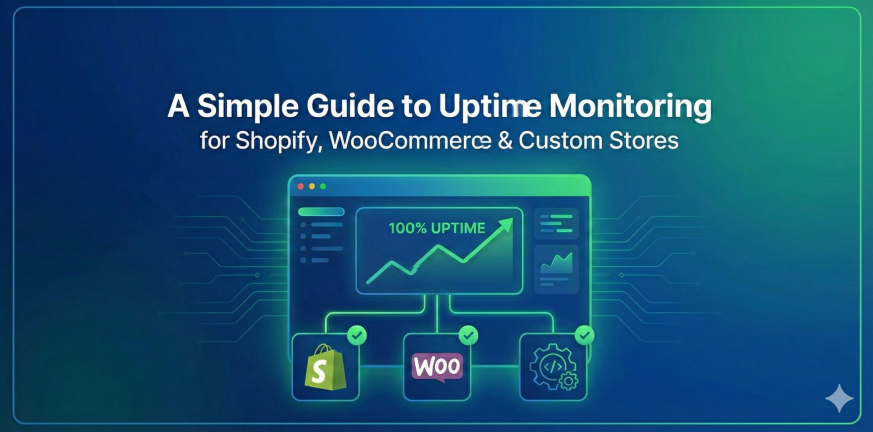
A Simple Guide to Uptime Monitoring for Shopify, WooCommerce & Custom Stores

Running an online store is exciting — until the day it goes offline.

Maybe it’s a sudden traffic spike.
Maybe the hosting provider is having issues.
Maybe a plugin update didn’t go the way you hoped.

Whatever the reason, downtime hurts. Every minute a store is unavailable, customers can’t shop, ads continue spending, carts get abandoned, and the reputation you worked hard to build takes a hit.

If you’re a Shopify or WooCommerce owner, or you run a fully custom-coded store, uptime monitoring isn’t just a technical detail — it’s revenue protection. In this guide, we’ll break down what uptime monitoring is, why it matters, and how store owners (even non-technical ones) can implement it properly.
Why Uptime Monitoring Matters More for eCommerce Than You Think

Let’s paint a quick picture.

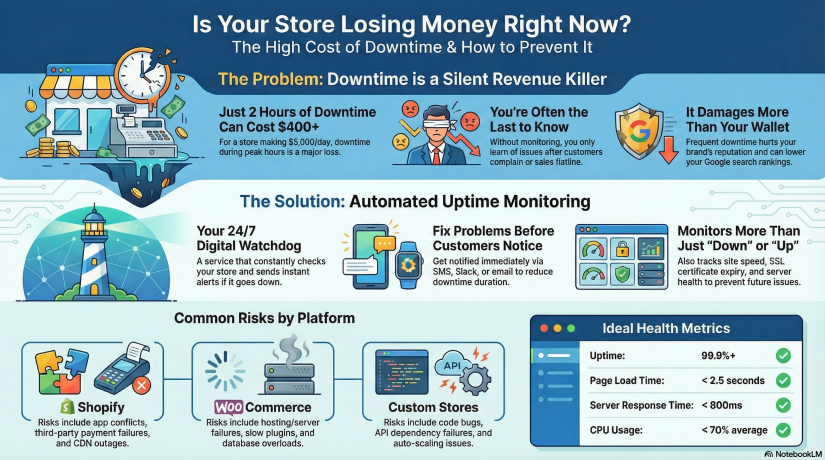
Imagine your store makes $5,000/day in sales.
That’s about $208/hour.

Now imagine your store goes down for just 2 hours during peak traffic.

You just lost over $400 without even knowing it happened — and customers who tried to buy from you might not come back.

Now scale that up during events like:

  • Black Friday / Cyber Monday

  • Product launch

  • Social media viral moment

  • Paid advertising campaign

  • Email marketing blast

  • Holiday season rush

During high-traffic events, just 30 minutes of downtime can cost thousands.

This is why uptime monitoring is essential. It allows you to:

  • Know instantly when your store is down — before your customers do
  • Reduce downtime with faster incident response
  • Prevent revenue loss and protect brand trust
  • Track performance over time with real monitoring metrics
  • Build reliability — important for SEO & customer loyalty

Google even takes site reliability into account for ranking. Search engines don’t like unreliable websites — if crawlers repeatedly find your store down, your rankings can drop.


What Exactly Is Uptime Monitoring?

Uptime monitoring is a service that constantly checks your website to ensure it’s reachable and functioning. If something fails — server crash, DNS issue, payment gateway outage — you get notified immediately via email, SMS, push, Slack, Telegram, or other channels.

Think of uptime monitoring as 24/7 security for your online business.

Most website owners assume hosting includes monitoring. It does not. Hosting companies only guarantee infrastructure uptime (to a limit), but they don’t actively alert you when your site is down.

With uptime monitoring, you will know:

✔ When your website becomes unreachable
✔ When response times slow down
✔ If SSL is about to expire
✔ If server resources are overloaded
✔ If plugins or themes cause failure

Without monitoring, you only know after customers complain — or worse, after checking your revenue dashboard and seeing something is wrong.


Shopify vs WooCommerce vs Custom Stores — Different Stores, Different Risks

Let’s break down the typical risks each platform faces.

Shopify Stores

Shopify is stable, hosted, and handles infrastructure — but that doesn’t mean downtime can’t happen. Risks include:

  • Theme or app conflicts

  • CDN outages

  • Regional downtime

  • Third-party payment failures

  • DNS misconfiguration

  • Store disabled due to billing or policy issues

Shopify takes care of hosting, you must take care of monitoring.


WooCommerce Stores (WordPress)

WooCommerce gives you more control — but with control comes responsibility. Risks:

  • Hosting/server downtime

  • Slow performance from heavy plugins

  • Caching issues

  • Expired SSL certificates

  • Vulnerability or malware attacks

  • Database overload during traffic peaks

WooCommerce stores must monitor server + website + SSL + DNS + performance.


Custom-Built Stores

Custom is unlimited — but also unpredictable. Risks include:

  • Bugs or deployment issues

  • API dependency failures (Stripe/PayPal failures break checkout)

  • Hosting or VPS instability

  • Cache misconfigurations

  • Auto-scaling failure

  • Cron jobs breaking

  • Custom code errors

Custom stores need the most comprehensive monitoring approach.


The 3 Layers of Monitoring Every Store Needs

1. Website Uptime Monitoring

Checks your URL from multiple regions every X seconds.

Good monitoring will test more than “is the page loading?” It will test:

  • HTTP status code

  • Load speed

  • Page response consistency

  • Global availability (US/EU/Asia)

  • Redirect issues

If something breaks, you get alerted within minutes.


2. Server/Hosting Monitoring (WooCommerce & Custom Stores)

Tracks deeper infrastructure metrics such as:

Metric Why it matters
CPU usage Spikes cause slow checkout & crashes
RAM WordPress + plugins = memory hungry
Disk Full disk = site instantly breaks
Network Packet loss = regional outages
Load average Predict performance degradation

This is where platforms like Xitoring become useful.
You can monitor both uptime + server health in one place, meaning you catch problems early — before the site goes down.


3. SSL, DNS & Domain Monitoring

Small things store owners forget, but they break sites instantly:

  • SSL expiration = browsers block visitors

  • DNS misconfiguration = site unreachable

  • Domain expiration = business offline overnight

Your store might be perfect — but expired SSL = dead website.

Monitoring prevents this.


How Uptime Monitoring Tools Work (Simple Breakdown)

Here’s what happens inside an uptime monitoring system:

  1. You add your store URL to the dashboard

  2. The monitor pings your site from different global regions every few seconds/minutes

  3. If it fails (timeout/500 error/slow response/SSL issue), a second location verifies

  4. Once confirmed, notifications are instantly sent

  5. A detailed report logs duration, cause & resolution time

This means you don’t have to constantly check your site manually — the system watches it for you.


Setting Up Monitoring for Your Store — Step-by-Step

Even if you’re non-technical, setup is simple.

For Shopify Stores

No server setup required — just monitor your front URL.

  1. Add your store domain

  2. Choose alert channels (email/SMS/Telegram/Slack)

  3. Enable response-time monitoring

  4. Add SSL expiration monitoring

  5. Set check intervals (1–5 minutes recommended)

Optional advanced step: monitor specific URLs (checkout, add-to-cart, payment page)


For WooCommerce Stores

You should monitor website + server + database.

  1. Add your store domain for uptime checks

  2. Install server agent (if using VPS hosting)

  3. Monitor resource usage (CPU/RAM/Disk)

  4. Add MySQL database monitor

  5. Enable plugin/theme update alerting

  6. Monitor REST API endpoints

  7. Add SSL & DNS monitoring

Bonus: create a status page to publicly show uptime history.


For Custom Stores

Create a multi-layer setup:

  • HTTP uptime monitoring

  • Ping monitoring

  • Port monitoring (80/443/DB/Redis)

  • Server resource logs

  • API endpoint monitoring

  • Cron job/queue monitoring

  • Synthetic tests for key flows

A simple test example:

Can a user add product → checkout → complete payment?

Synthetic monitoring can simulate that automatically.


How Xitoring Can Help (Naturally Integrated Example)

While many tools can monitor websites, eCommerce stores benefit most from a platform that supports both uptime + server monitoring + alerts + status pages — all together.

Xitoring allows you to:

  • Add uptime checks for Shopify/WooCommerce/Custom stores

  • Monitor CPU, RAM, Disk, Network of your servers

  • Create public or private status pages

  • Receive alerts through email, SMS, Slack, Telegram & more

  • Detect anomalies using AI-powered insights

  • Avoid downtime with automated alerts before failure happens

Instead of juggling multiple tools, you get an all-in-one overview of your store health.

Not promotional — just a realistic example of how store owners reduce downtime stress.


Real-World Downtime Scenarios & How Monitoring Saves You

Scenario 1 — Traffic spike crashes WooCommerce

Black Friday + shared hosting = server overload.

Without monitoring:
You notice only after angry emails or sales flatline.

With monitoring:
CPU/RAM spike alert → increase server power → downtime avoided.


Scenario 2 — Shopify App breaks the checkout

A newly installed upsell app conflicts with your theme.

Monitoring catches a jump in response times + checkout failures. You restore backup fast — no major revenue loss.


Scenario 3 — Custom site SSL expires

Browser warnings kill conversions. Easily preventable.

Monitoring alerts you days or weeks in advance. Crisis avoided.


KPIs Store Owners Should Track

To remain stable and fast:

KPI Ideal Target
Uptime 99.9%+ minimum
Page load time < 2.5 seconds
Response time < 800ms average
SSL expiry > 30 days before renewal
CPU usage < 70% average load
Error rate As close to 0% as possible

Even beginners can track these.


Best Practices to Keep Your Store Online & Fast

  • Run monitoring 24/7 — don’t rely on manual checks
  • Test uptime from multiple global locations
  • Monitor critical user flows, not just homepage
  • Use a CDN & caching for faster response times
  • Always monitor SSL, DNS & domain expiration
  • Keep plugins/themes updated and secured
  • Set alerting to multiple channels (email + SMS/Telegram)

A monitoring tool is your seat belt. You hope you never need it — but when you do, it saves you.


At the End!

Whether your online store runs on Shopify, WooCommerce, or a custom platform, uptime monitoring is one of the simplest and smartest steps to protect revenue. Downtime will happen eventually — what matters is how fast you know about it and how quickly you fix it.

Monitoring isn’t just technical infrastructure — it’s business protection.
It is reputation preservation.
It is revenue insurance.

And thankfully, setting it up today is easier than ever.

Take 10 minutes, add a monitoring setup, connect alerts — future-you will be grateful.

The Perfect Monitoring Stack: Tools & Strategies Every DevOps Engineer Should Use in 2025

Modern infrastructure is distributed, fast-moving, and increasingly complex. DevOps engineers are expected to deploy faster, detect issues earlier, automate responses, and ensure systems stay reliable — all while keeping cloud costs sane. Monitoring is no longer a “nice-to-have” tool running in the background. In 2025, a great monitoring stack is a first-class component of your infrastructure.

But here’s the truth:
Most companies don’t have a unified monitoring strategy — they have tool chaos.
Five dashboards, three alert systems, two clouds, and still nobody notices the CPU spike until the customer opens a support ticket.

This article helps you build a complete monitoring stack step-by-step — one that helps DevOps teams detect, diagnose, and react to problems before users even notice.

What We’ll Cover

  1. Why monitoring matters more than ever in 2025

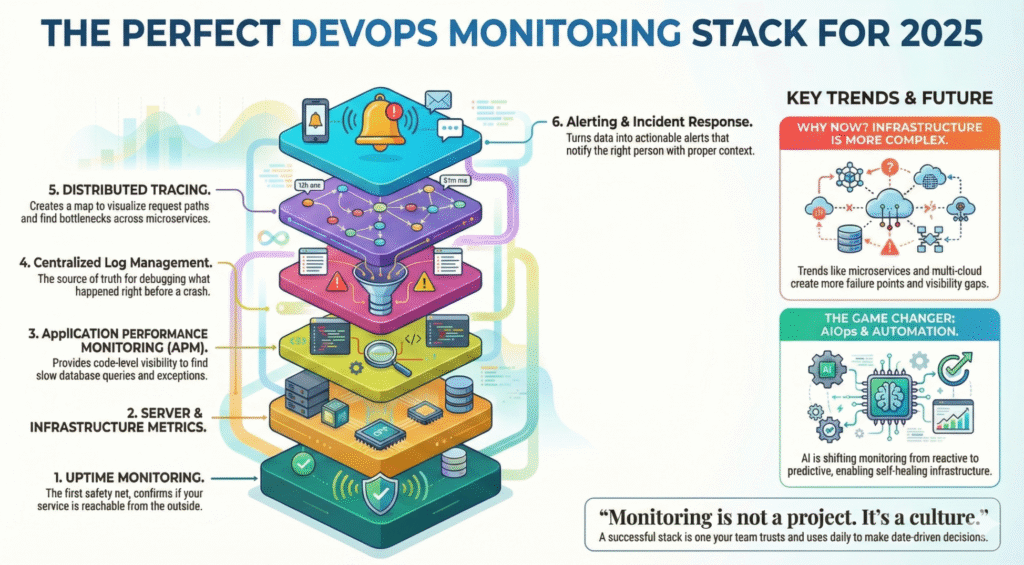
  2. The 6 pillars of a perfect monitoring stack

  3. Best-fit tools (open-source + SaaS) for each layer

  4. Automation & AIOps for faster incident response

  5. Real example workflows using Xitoring

  6. Best practices for building a future-proof observability culture

Grab your coffee — let’s design the perfect monitoring ecosystem.

Why Monitoring Matters More Than Ever in 2025

Infrastructure trends are shifting:

Trend Result
Microservices > Monoliths More distributed failure points
Multi-cloud adoption Harder visibility & metrics correlation
Remote teams & global systems Need 24/7 monitoring & automation
AI-powered users & workloads Higher performance sensitivity
Uptime expectations near 100% Incidents cost more than ever


Even small outages hurt. A few minutes of downtime during checkout can cost an eCommerce store thousands. A performance degradation in a SaaS app directly affects churn. And for services with SLAs, downtime = money out of the pocket.

Monitoring isn’t just about uptime anymore — it’s about:

✔ Performance optimization
✔ User experience protection
✔ Fast incident response
✔ Predictive failure detection
✔ Data-driven engineering decisions

Your monitoring stack is your early warning system, your forensic lab, and your operations assistant — all in one.

The 6 Pillars of a Perfect Monitoring Stack

A mature monitoring setup includes multiple layers working together:

  1. Uptime Monitoring & Status Checking

  2. Server & Infrastructure Metrics

  3. Application Performance Monitoring (APM)

  4. Logs & Centralized Log Management

  5. Tracing & Distributed Observability

  6. Alerting, Incident Response & Automation

Most failures don’t happen in isolation — so a good stack correlates metrics across all layers.

Let’s break these down one by one.


1. Uptime Monitoring — The First Safety Net

Uptime checks confirm whether your service is reachable from the outside. This is critical for:

  • Availability tracking

  • SLA reporting

  • Detecting DNS/SSL/network issues

  • Early outage detection before customers notice

Your uptime monitor should:

  • Ping from multiple global locations

  • Support HTTP, TCP, ICMP, DNS & port checks

  • Alert instantly when downtime starts

  • Provide public/private status pages

  • Track historical uptime & incidents

Good Tools:
🔹 Xitoring (Uptime + server monitoring in one platform)
🔹 UptimeRobot, Pingdom, BetterUptime
🔹 DIY with Prometheus + Blackbox Exporter

Example Workflow with Xitoring:
You configure uptime checks for APIs and landing pages. Xitoring monitors from global nodes every minute and instantly alerts via Slack/Telegram if latency spikes or the endpoint becomes unreachable. The status page updates automatically — no manual comms required.


2. Server & Infrastructure Monitoring

This is where you track CPU, RAM, load average, disk IO, network throughput, system logs, and more.

Why it matters:
Many outages start here — memory leaks, full disks, CPU throttling, kernel issues, resource exhaustion.

A server monitoring tool in 2025 should provide:

✔ Metric collection & dashboards
✔ Threshold-based & anomaly alerts
✔ Process/service monitoring
✔ Linux + Windows support
✔ Agent or agentless collection

Tools to Consider:
Open-source: Prometheus + Node Exporter, Zabbix, Grafana
SaaS: Datadog, New Relic, Xitoring for real-time insights

Where Xitoring fits:
Xitoring installs a lightweight agent, monitors Linux/Windows metrics, and uses AI pattern detection to warn you about unusual performance behaviors before they cause downtime.


3. Application Performance Monitoring (APM)

Even if servers look healthy, your application might be struggling.

APM provides:

  • Code-level performance traces

  • Slow endpoint/database query detection

  • Memory leaks & exception tracking

  • End-to-end latency breakdowns

If your application scales fast or spans micro-services, APM isn’t optional — it’s survival.


4. Logs — The Source of Truth During Incidents

When something breaks, engineers run to dashboards… and then eventually to logs.

Centralized logging helps answer:

  • What happened before the crash?

  • Which service threw the exception?

  • Did the deploy introduce a bug?

  • Is it a system issue or an external dependency?

Log Stack Examples:

  • ELK (Elasticsearch + Logstash + Kibana) — flexible, widely used

  • Grafana Loki — cheaper & scalable

  • Graylog, Splunk — enterprise search capabilities

  • Cloud native logs — GCP Logging, AWS CloudWatch

Logging must be centralized; SSH-ing into servers to tail logs is a 2010 problem.


5. Distributed Tracing — Understanding System Behavior

When requests pass through queues, services, load balancers, and databases — tracing is your map.

Distributed tracing helps:

✔ Visualize request paths
✔ Identify bottlenecks across microservices
✔ Debug timeouts, retries, failures

Standards & Tools:

  • OpenTelemetry (industry standard)

  • Jaeger, Zipkin

  • AWS X-Ray / GCP Cloud Trace

Tracing ties APM + logs + metrics together to reveal the full picture of an incident.


6. Alerting & Incident Response

Monitoring is useless without actionable alerts. No one wants alert fatigue, but silence during outages is even worse.

A modern alerting workflow should:

  1. Detect

  2. Notify the right person

  3. Provide context (dashboards, logs)

  4. Trigger automated remediation when possible

Alert Channels:

  • Slack, Teams, Email

  • PagerDuty / OpsGenie

  • Telegram, SMS

  • Webhooks for automation

Xitoring Example:
When CPU stays above 90% for 10 minutes, Xitoring sends alerts via Slack and Telegram, attaches system metrics, and can trigger automated scripts (e.g., restart a service or scale pods).

AIOps & Automation — The 2025 Game Changer

Monitoring evolution is moving from reactive → predictive.

AI can help detect:

  • Unusual traffic spikes

  • Slow memory leaks

  • Latency changes before user impact

  • Behavior trends that lead to failure

Platforms like Xitoring already integrate AI-based anomaly detection, enabling:

🔹 auto-alerting before outages
🔹 suggestion of root causes
🔹 automated recovery triggers

The future is self-healing infrastructure.

Best Practices for DevOps Teams in 2025

  • Alert on symptoms, not noise
    CPU spike alone isn’t a problem — a spike + latency increase is.

  • Use status pages
    Reduces support load and builds trust with customers.

  • Track SLO/SLI metrics
    Reliability is measurable, and you can improve only what you track.

  • Observe deployments closely
    Most incidents are human releases.

  • Monitoring is not a project. It’s a culture.


Final Thoughts

A perfect monitoring stack doesn’t mean buying the most expensive tool or over-engineering your observability pipeline. It means combining layers that give you visibility from user request → server → application → logs → root cause.

If there’s one takeaway:

Monitoring shouldn’t tell you something went wrong — it should tell you why and how to fix it fast.

Whether you choose an open-source stack, enterprise platform, or a unified solution like Xitoring that combines uptime + server monitoring with AI insights, the key is building a system your team trusts and uses daily.

Best Practices for Setting Up Server Monitoring

Servers in every sector depend on their servers to deliver seamless and uninterrupted performance. Ranging from serving websites to servicing mission-critical applications, servers constitute the foundation of modern-day IT infrastructure. But without monitoring, even the most superior systems can experience issues that lead to costly downtime and irate users. This makes server setup for monitoring not an optional add-on, but a mandatory practice to ensure operational effectiveness.

Think about it: just as businesses spend on tools that simplify processes and reduce risks, server monitoring is a preventive measure to ensure all runs smoothly and efficiently. Being able to monitor system performance and resolve potential problems before they turn into full-blown issues can save enormous time and money. It’s similar to keeping your online presence available all the time, which is critical to ensure customer satisfaction and trust.

(more…)

Top 10 Windows Server Monitoring Tools in 2025 – CTO Guide

As a CTO or CEO of a small to medium-sized IT company, you’re not just managing technology; you’re managing the lifeblood of your business and your clients’. In today’s digital-first world, your servers are the heart of operations. When they go down, business grinds to a halt. Revenue, reputation, and customer trust are all on the line. That’s why Windows Server monitoring isn’t just an IT task; it’s a core business strategy.

But let’s be direct. You don’t have the time or the budget for overly complex, enterprise-level tools that require a dedicated team to manage. You need power, but you also need simplicity and value. You need a solution that gets straight to the point: keeping your systems online and performing optimally.

That’s why we’ve done the heavy lifting for you. In this guide, we’ll break down the top 10 Windows Server monitoring tools for 2025, with a special focus on what works best for businesses like yours. Let’s find the right tool to keep you in control and your business running flawlessly. 🚀

(more…)

How to Achieve 99.99% Uptime for Your Website

Achieving 99.99% uptime requires a multi-layered strategy focused on redundancy, automated failover, and proactive monitoring. This means designing your infrastructure to handle failures without manual intervention, from individual servers to entire data centers. Key components include load balancing across multiple servers, replicating your database in real-time, using a Content Delivery Network (CDN) to distribute traffic, and implementing robust disaster recovery and monitoring systems.

(more…)

How AI Is Turning Server Monitoring into a Profit Center

For decades, the world of IT operations has been ruled by a single, heart-stopping symbol: the red alert. A server goes down, an application crashes, and a frantic scramble begins. This is the essence of traditional server monitoring, a reactive, high-stress cycle of break-fix that costs businesses dearly in both revenue and reputation.

But what if you could see the failure coming? What if you could fix a problem before your customers even knew it existed?


(more…)

How to Monitor InfluxDB Server Performance

In today’s data-driven world, time-series data is the lifeblood of countless applications, from IoT devices and real-time analytics to financial trading platforms and application performance monitoring. At the heart of many of these systems lies InfluxDB, a powerful, open-source time-series database celebrated for its speed and efficiency in handling high volumes of time-stamped data. But like any high-performance engine, InfluxDB requires careful attention and tuning to operate at its peak. This is where monitoring becomes not just a best practice, but a critical necessity.

In this comprehensive guide, we will explore the ins and outs of InfluxDB performance monitoring. We’ll delve into why it’s crucial, what key metrics you need to track, and how a specialized monitoring solution like Xitoring can empower you to move from reactive troubleshooting to proactive optimization.

(more…)

Illustration of a person monitoring multiple data screens in a control room, with the text "Enhance efficiency with IT Monitoring

How IT Monitoring Improves Business Efficiency

Businesses across industries increasingly rely on technology to power business, deliver services, and respond to customer needs. But sophisticated IT infrastructures are daunting, especially when disaster strikes at the worst possible moment. That is where IT monitoring enters the picture—a way through which businesses can remain at top levels of performance, prevent downtime, and enhance efficiency overall. Let us explore what IT monitoring is and why it is essential for businesses today.

(more…)

Illustration of a person standing next to a large laptop screen displaying a warning alert, with the text "Stay Ahead of Issues with Real-Time Server Alerts."

A Beginner’s Guide to Real-Time Server Alerts

Companies in most industries rely on their servers to provide smooth experiences for both customers and employees. Whether it’s processing transactions or hosting applications, server performance is vital to business success. But what if something stops the flow? A single moment of downtime can equal lost business, upset users, and even long-term reputational damage for your company.

This is where real-time server monitoring becomes useful. It is the lifeline of your IT infrastructure, providing you with ongoing monitoring and alerting you to potential issues before they spiral out of control. Think of it as having a never-sleeping guard dog for your systems—always on the watch and ready to act at a moment’s notice.

Real-time monitoring does not constitute just verifying if your servers are running or not. It delves deeper into important statistics such as CPU usage, memory, disk space, and network usage. Keeping a close eye on these, you can predict bottlenecks ahead of time and clear them in advance. Most server problems are caused by easily preventable issues such as overloading of resources or incorrect configurations, which can be easily fixed with the right monitoring software.

(more…)

Illustration of a person monitoring servers on dual screens, with the Xitoring logo on the left and the text "Server Monitoring with Xitoring

Why Choose Xitoring for Server Monitoring?

From powering websites and applications to managing critical data, servers seem to be a part of almost every aspect of modern operations. But what happens if these workhorses suddenly fall silent? Downtime can strike servers at any moment, causing frustration for customers, headaches for IT teams, and massive financial losses for businesses. From hardware failure and software bugs to something as simple as an outage, these are all common causes of downtime. Knowing and understanding them-along with learning how to handle them-will keep your company on target. In the following blog, we delve into unplanned outage causes and give you some actionable solutions that keep you steps ahead.

(more…)