Xitoring Document
Home
FAQ
Support
Register
Home
FAQ
Support
Register
  • Xitoring

    • Introduction
    • Release Notes
    • Xitoring Release Notes
    • Linux Xitogent Release Notes
    • Windows Xitogent Release Notes
    • Xitoring Mobile App Release Notes
    • Account Management
    • API Access & Automation
    • Team Management & Collaboration
    • Billing & Subscription Management
  • Getting Started

    • Getting Started with Xitoring
    • Workflows & Guides
    • Monitor Your First Server
    • Import / Migration
    • Migrate from UptimeRobot to Xitoring
    • Migrate from Pingdom to Xitoring
    • Migrate from Uptime.com to Xitoring
    • Migrate from BetterStack to Xitoring
  • Help & Support

    • FAQ & Troubleshooting
    • Glossary
  • Server Monitoring

    • Server Monitoring
    • Graphs
    • Live Statistics
    • Monitor Services
    • Auto-Triggers
  • Xitogent on Linux

    • Install Xitogent on Linux
    • Update Xitogent on Linux
    • Uninstall Xitogent on Linux
  • Xitogent on Windows

    • Install Xitogent on Windows
    • Uninstall Xitogent on Windows
    • Xitogent Service
    • Update Xitogent on Windows
    • Disk Performance (I/O)
  • Xitogent on Azure

    • Xitogent on Azure
    • Monitor Azure Linux VM
    • Monitor Azure Windows VM
  • Xitogent CLI

    • Xitogent CLI
    • Xitogent Pause/Unpause
    • Xitogent Status
    • Xitogent debug
    • Xitogent Diagnosis
    • Which data we collect
  • Xitoring CLI

    • Xitoring CLI
  • Uptime Monitoring

    • What is Uptime Monitoring
    • Monitoring Nodes (Geographic Locations)
    • What is Check
    • Auto-Discovery
    • Auto Fault Tolerance
    • Heartbeat Check
    • Ping Check
    • HTTP(S) Check
    • DNS Check
    • FTP Check
    • SMTP Check
    • IMAP Check
    • POP3 Check
    • TCP Check
    • UDP Check
  • SSL Monitoring

    • SSL Monitoring
  • Incidents

    • Incidents
    • Incident's Root Cause
    • Incidents Notification
    • Incident Notes
    • Resolving Incidents Manually
    • Incident Policy
  • Maintenance Schedule

    • Maintenance Schedule
  • Email Reports

    • Email Reports
  • Integrations

    • Integrations
    • Apache Integration
    • CoreDNS Integration
    • CouchDB Integration
    • Disk Health Integration
    • Docker Integration
    • Dovecot Integration
    • Exim Integration
    • HAProxy Integration
    • IIS Integration
    • InfluxDB Integration
    • Kafka Integration
    • KeyDB Integration
    • LiteSpeed Integration
    • MongoDB Integration
    • MySQL Integration
    • Netstat Integration
    • Nginx Integration
    • OpenLiteSpeed Integration
    • OpenVPN Integration
    • PHP-FPM Integration
    • Postfix Integration
    • PostgreSQL Integration
    • RabbitMQ integration
    • Redis Integration
    • MS SQL Server Integration
    • Supervisor Integration
    • Varnish Integration
    • Wireguard Integration
  • Notifications

    • Notifications
    • Creating Notification Roles
    • Email Integration
    • Mobile Push Notifications
    • SMS Integration
    • Phone call Integration
    • Webhook Integration
    • Integration for Slack
    • Telegram Integration
    • WhatsApp Integration
    • Mattermost Integration
    • Discord Integration
    • Google Chat Integration
    • Microsoft Teams Integration
    • Atlassian Opsgenie Integration
    • Splunk On-Call Integration
    • Pushover Integration
    • Pushbullet Integration
    • Gotify Integration
    • Ntfy Integration
    • Spike.sh Integration
    • PagerDuty Integration
    • Zapier Integration
    • AlertOps Integration
  • Status Page

    • Status page
  • 3rd Party Status Pages

    • Using 3rd party Status Pages
    • Atlassian Status Page Integration with Xitoring
    • Status.io Integration with Xitoring
    • Statuspal Integration with Xitoring
    • Instatus Integration with Xitoring
  • Dashboards

    • Main Dashboard
    • Custom Dashboards
  • Metrics

    • Metrics
  • MCP Server

    • Setup & Tool Reference

Notifications

Notifications are the heart of our alerting system that keeps you and your team informed of any incident or issue for troubleshooting. Xitoring team is working hard o add more Notification Channels each month, if you have any specific requirements, you can always reach us.
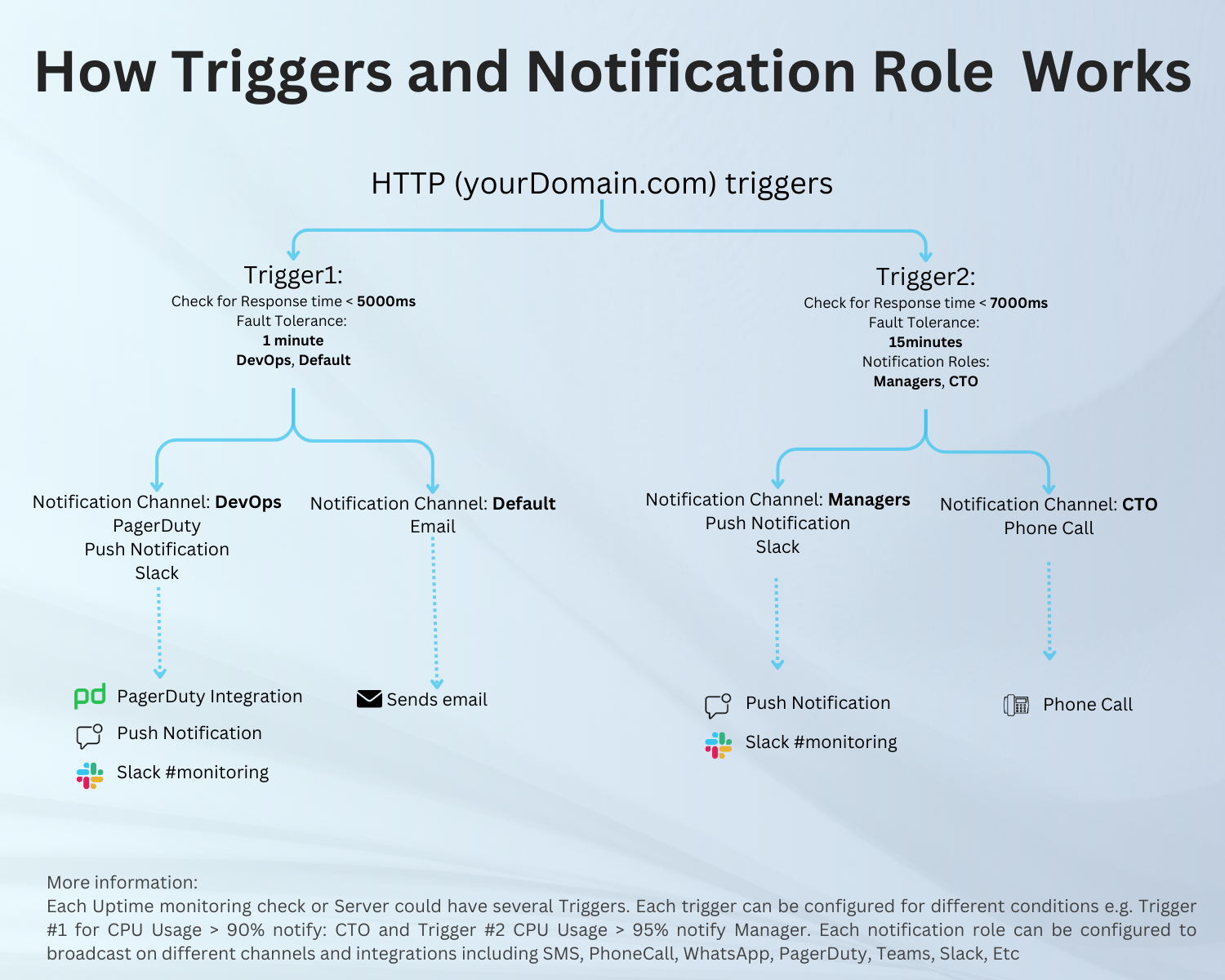
How Xitoring notification roles and triggers works

Notification Channels

  • E-Mail: You can create Email notification roles on the Notification Role page, Also you can add your teammates' Email addresses to a notification role.
  • Mobile Push Notification: Install Xitoring mobile application and get instant notifications on your phone!
  • SMS: You can enable SMS notifications simply by adding a Mobile Number to a Notification role.
  • Phonecall: You can enable Phonecall alerts simply by adding a Mobile Number to a Notification role.
  • Webhook: Set up webhooks for advanced alerts to your system or app.
  • Slack: Keep your whole team informed of incidents on a Slack channel.
  • Telegram: Telegram Messenger is a globally accessible freemium, get your incidents on Telegram!
  • WhatsApp: WhatsApp is a freeware, cross-platform, centralized instant messaging, get your incidents on WhatsApp!
  • MatterMost: Mattermost is an open-source, self-hostable online chat service with file sharing, search, and integrations!
  • Discord: Discord is an instant messaging and VoIP social platform.
  • Google Chat: Google Chat is a communication service developed by Google. Initially designed for teams and business environments.
  • Microsoft Teams: Microsoft Teams is a proprietary business communication platform developed by Microsoft, as part of the Microsoft 365 family of products.
  • Atlassian Opesgenie: Opsgenie is a modern incident management platform that ensures critical incidents are never missed.
  • Splunk: Splunk On-Call is a hub for centralizing the flow of information throughout the incident lifecycle.
  • Pushover: Pushover makes it easy to get real-time notifications on your Android, iPhone, iPad, and Desktop
  • Gotify: Gotify is a server for sending and receiving messages in real-time per web socket.
  • Pushbullet: Pushbullet bridges the gap between your phone, tablet, and computer, enabling them to work better together.
  • Ntfy: ntfy (pronounced notify) is a simple HTTP-based pub-sub notification service
  • Spike.sh: Spike.sh is a simple on-call and incident management platform
  • PagerDuty: PagerDuty is one of the most used on-call and incident management platform
  • Zapier: Workflow automation software for everyone.
Last Updated: 4/2/24, 1:06 PM
Next
Creating Notification Roles